
Earlier this year Google Analytics launched ‘User Explorer’, a new reporting function designed to allow website owners to view and track how individual users are interacting with their sites and apps.
Let’s take a closer look at what behavior this new ‘User Explorer’ tool tracks and how it can help understand your website audience.
This blog post applies to Universal Analytics, if you are planning to install User ID reporting form scratch it is recommended to go with the new Google Analytics 4 implementation. Get to know more about the new GA4 here and how you can implement the User-ID feature on GA4 here.
‘User Explorer‘ tags individual user data by two separate means: Client ID and User ID. Both functions are accessed from the ‘Audience’ section of the tool.
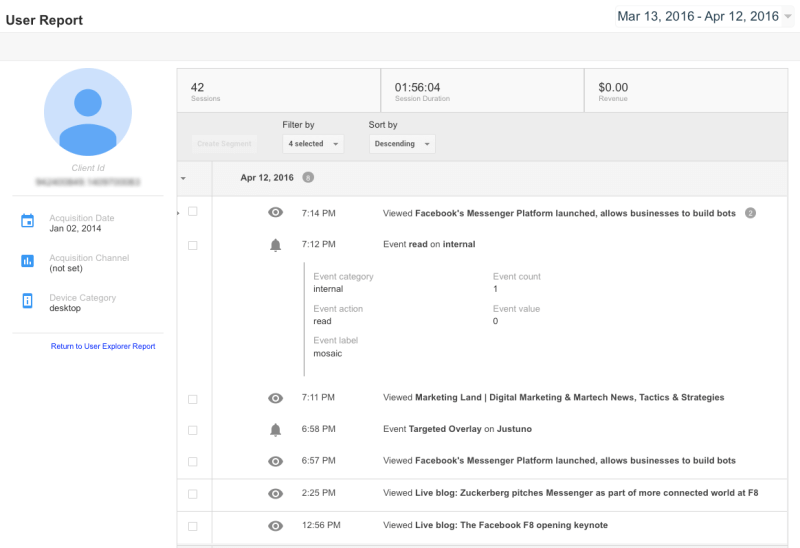
Client ID provides a unique identifier which anonymously tracks a web browser instance. The Client ID is randomly generated and automatically sent with all hits by Analytics libraries. In a non-User-ID-enabled view (profile), Client ID is used to calculate unique users. This means you will be tracking anonymous not logged in user in each individual device.
If activated, User ID tracks specific users independent of the browser and across multiple devices. A single user, like a signed-in user account, that may interact with content across one or more devices or browser instances. User needs to send own User-IDs with Analytics hits. In a User-ID-enabled view (profile), User ID is used to calculate unique users. This ID will allow you to better understand your multi-device presence and your users behaviours upon it. See how to set up the User ID.
When looking at data from all individual Client or User IDs, the tool allows analysts to view the number and length of each session, as well as the total number of transactions, conversion rates, and revenue generated.
Unique individual sessions can then be examined to learn how and when users accessed their site, and via what device, whether it be desktop, tablet, or mobile phone.
In addition, the data can be segmented into specific user cases. For example, it’s possible to create a view of all of the users who left at a certain phase of the conversion process, perhaps during a purchasing review or other step in the buying process.
By examining this data, a marketer might find that users accessing their site from mobile phones or tablets are falling off at greater rates than those using a desktop. They might then be able to improve the mobile browsing experience to increase conversion rates for those users.
The User Explorer report is a fantastic tool that gives marketers a more granular look at how individual users are behaving on their sites. While it’s still better to start with an aggregated analysis of the metrics, people with more experience in digital analytics will find the report useful and will uncover actionable intelligence that can convert users into customers.
Finally tracking individual user behavior can help understand issues experienced in your website reported by individual shoppers.
NetSuite hit the stage in Las Vegas a year ago and introduced NetSuite The next… Read More
For mid-market B2B brands running NetSuite, two platforms dominate the storefront decision: SuiteCommerce Advanced and… Read More
SuiteCommerce Advanced development is one of the more specialized skills in the eCommerce agency market.… Read More
One of the most consequential SEO decisions for eCommerce merchants is how to structure product… Read More
BigCommerce has become a leading choice for B2B brands building online storefronts. Its B2B Edition,… Read More
Based on an analysis of 7 million websites, SiteLock reported that websites experience an average… Read More