
SuiteCommerce Advanced

Out-of-Stock Behavior Ideas for Your NetSuite eCommerce Website

Whether you are on SuiteCommerce or SuiteCommerce Advanced, you have different options when it comes to setting up the out-of-stock product behavior on NetSuite eCommerce: you can always show out-of-stock products and allow purchasing, remove them, or show them with an out-of-stock message. You can even go more sophisticated and apply specific out-of-stock behavior rules.

Whatever path you choose just keep in mind that there is nothing more frustrating to a customer than to find the exact product they want to order only to hit the “add to cart” button and get an “out-of-stock” message. Many customers research to find the exact product they want before they make the move to buy it. You can lose a customer at this point. There is data to show you that mismanagement of product pages can increase your lost sales percentage, and in 2022, a survey said that 65% of online shoppers had been disappointed by out-of-stock products in the past 12 months. Today, we talk about some good out-of-stock behavior ideas to avoid losing clients when the situation arrives.
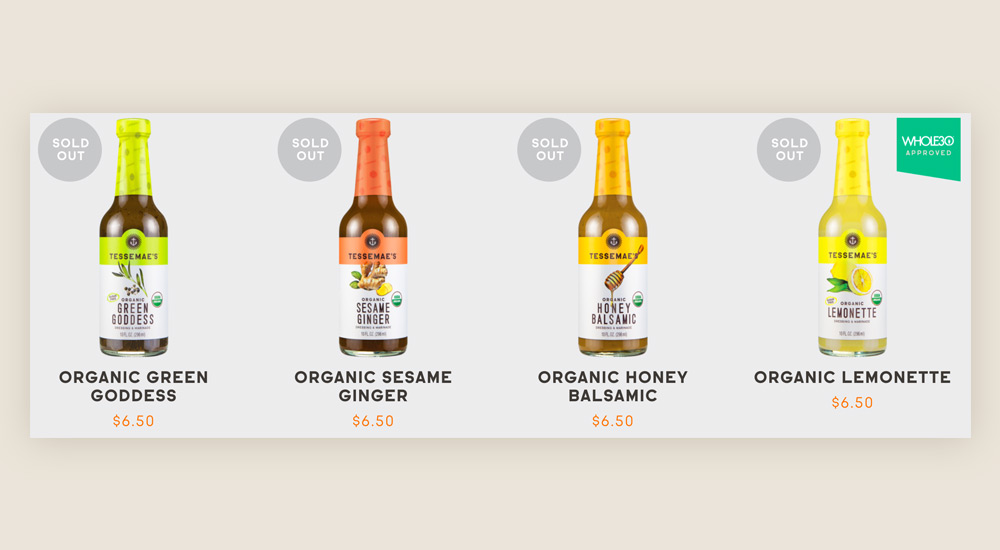
What your out-of-stock setup should not do:

  1. Don’t immediately redirect your customer to another product.
    – The customer who researched for their specific product probably already crossed off this one.
    – Another customer may feel like they have been scammed with something great only to be offered a cheaper, less desirable product that wouldn’t sell otherwise.
  2. The “404” page tells a customer it no longer exists. You’re telling your customer that you no longer carry this product, and you don’t care that you have wasted their time.

Put customer service into your out-of-stock action:

Your NetSuite eCommerce business needs to illuminate customer service as if the customer has walked into your brick-and-mortar store. How would you handle the same situation in a face-to-face situation?

  • Communicate quickly how sorry you are to have disappointed them.
  • Communicate clearly if you will have more in stock and an expected fulfillment date.

  • Ask if they want to be notified once the item is available. Is there a way to send out a notification to any customers on a waiting list to be honored with the chance to purchase the product prior to going live to the public?

  • Ask if they would like to see other options.

  • Offer a discount to show a customer you value their business if they should select another similar item.

How to better manage your NetSuite eCommerce store pages

How you handle your out-of-stock pages may reflect on your rankings and have an impact on your crawl allowance.

To know how customers will react to how you construct your out-of-stock actions will mean you have to experiment to find out what works and what does not work.

  • Why are you out of stock? Be as definitive as possible, such as “seasonal, high demand or manufacturing issues.”

  • Where are you letting the customers know that a product is not available? Giving the information on a page that doesn’t make the customer drill down to the final product page would be the better situation. Don’t waste their time, because maybe they are shopping with limited time.

  • Maybe there are multiple selections a customer must make such as size, color or style of a product that will determine what is in or out of stock. Don’t make them spend time only to discover exactly what they want is not available.

  • Offer to show a customer other products. They might like to see what other customers have bought that is very similar. Your analytics should be able to give you that data.

We can help you better understand your NetSuite eCommerce business processes and optimize your website for more sales. Contact our SuiteCommerce developers today to find new ways to leverage your eCommerce platform, improve customer experience, and boost conversions.

Fran Galperin

Fran Galperin is the Director of Tavano Team. Over the years, Fran has amassed immense knowledge and expertise in the NetSuite ERP and SuiteCommerce fields, becoming the most trusted advisor for +70 NetSuite clients.

Recent Posts

NetSuite Integration Guide: How to Connect Your eCommerce Stack to Your ERP

Most NetSuite merchants reach a point where the ERP is doing its job but the… Read More

5 days ago

NetSuite for SaaS Companies – How Software & SaaS Companies Scale Online Sales with NetSuite eCommerce and NetSuite ERP

Software and SaaS companies are often the first to adopt new tech — and they… Read More

2 weeks ago

Mailchimp NetSuite Integration: How to Sync Your Email Lists Without Losing Customer Data

Mailchimp is still one of the most widely used email platforms in eCommerce. If you… Read More

2 weeks ago

NetSuite Next Agentic Workflows Explained: Real Use Cases for eCommerce Operations

The term “agentic AI” gets used in every major software announcement right now, and it… Read More

2 weeks ago

NetSuite Next: AI-Powered ERP Features, Capabilities and What Changes for eCommerce

If you run your business on NetSuite and you have not heard about NetSuite Next… Read More

2 weeks ago

Shopify NetSuite Integration: NetSuite Connector vs. Celigo vs. Tavano Team’s Connector

If you're researching a Shopify-NetSuite integration, you'll run into three real contenders: Oracle's own NetSuite… Read More

2 weeks ago